> For the complete documentation index, see [llms.txt](https://blogs.labii.com/llms.txt). Markdown versions of documentation pages are available by appending `.md` to page URLs; this page is available as [Markdown](https://blogs.labii.com/feature-updates/2019-06-02-labii-eln-and-lims-v4-released.md).
# 2019-06-02 Labii ELN & LIMS (v4) Released
2019-06-02
We’ve focused on the customer, listening to their issues and challenges, and we are excited to introduce the newest version of [Labii](https://www.labii.com/) [Electronic Lab Notebook (ELN)](https://www.labii.com/electronic-lab-notebook-eln) and [Laboratory Information Management System (LIMS)](https://www.labii.com/laboratory-information-management-system-lims) platform! In this version, we focused on improving the user interface and overall user experience, responsive design for mobile, and making it easier for our users to customize the platform to meet their needs and expectations. Here are a few highlights:
## **A complete Mobile Responsive Design - seamless user experience for all mobile devices and tablets**
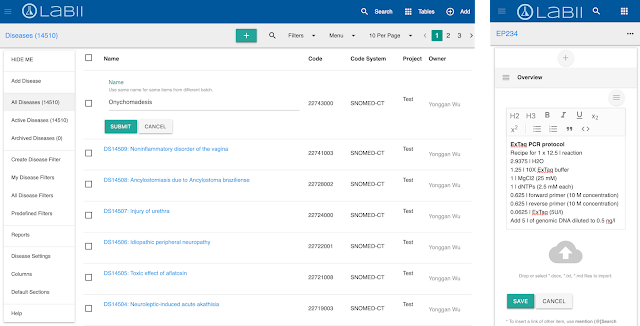
A complete mobile responsive design will allow you to continue your [Electronic Laboratory Notebook](https://www.labii.com/electronic-lab-notebook-eln) work on the go via your mobile device! The responsive design is supported on all major internet browsers on both phones and tablets; Enabling you to have your research data at your fingertips when a laptop is not accessible! Save time and continue your work on any mobile device with [Labii electronic notebook](https://www.labii.com/electronic-lab-notebook-eln)!
## **Updated list and details view that enables accessing your data in fewer clicks**
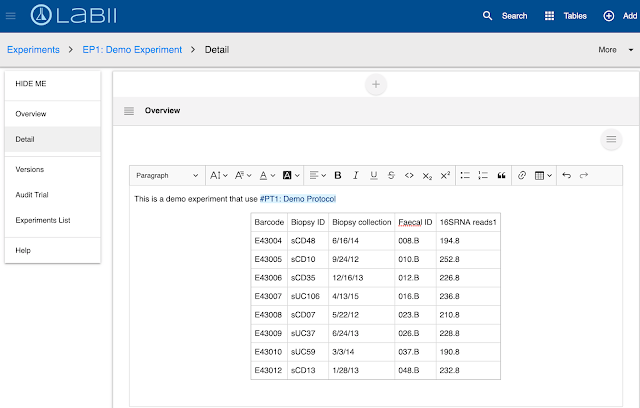
With an updated list and details view, you will be able to access your data in fewer clicks saving you time and effort with [Labii Electronic Lab Notebook (ELN)](https://www.labii.com/electronic-lab-notebook-eln)! On the left side, you’ll notice a new section in which you can view versions, audit trail, details, and more without having to leave the main interface. The data that is most important to you will now be easier than ever to access.
## **Improved Search Capabilities - easier to find, use, and get the results you are looking for in seconds.**
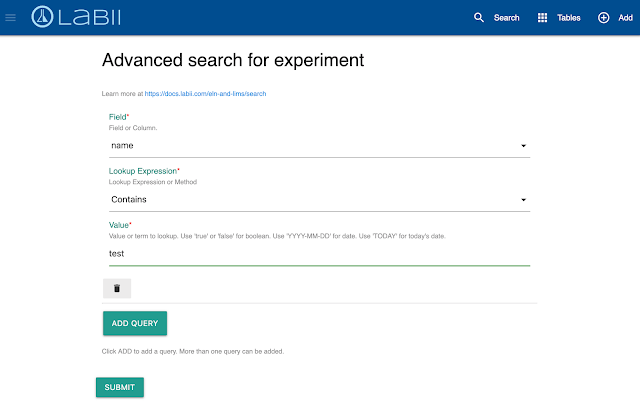
We’ve improved our search capabilities in [electronic notebook](https://www.labii.com/electronic-lab-notebook-eln), making it easier than ever to find, use, and get the results you are looking for in seconds! With the new navigation bar on top of the main interface, you can simply click the search icon. You have the ability to perform a quick search by typing one or two phrases, a deep search which will scan all searchable fields, and advanced search to limit the search results based on one or more particular fields. All of this can be done by clicking the search icon on the nav bar. Learn more at
## **Added report functions - Generate a report of your records based on tables, members, projects, etc.**
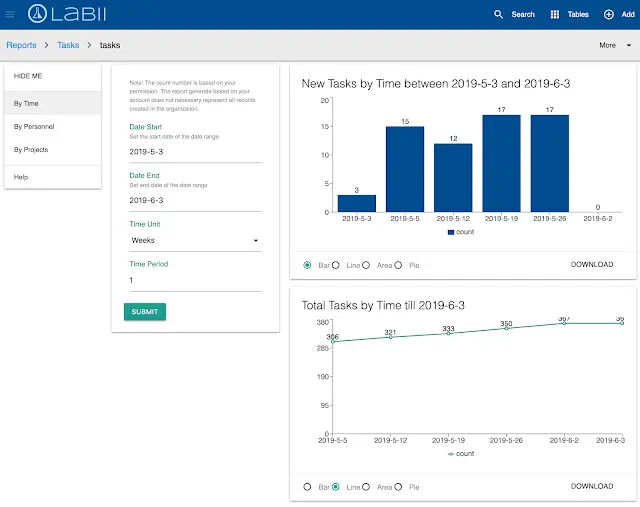
We’ve added report functions which will generate reports of your records based on tables, members, projects, etc. This feature can now accurately track the progress of all your projects and you do not have to interrupt your daily workflow to obtain these reports. [Labii ELN](https://www.labii.com/electronic-lab-notebook-eln) Reports will keep you and your team “in-the-loop” and satisfied regarding the progress of your research
To learn more, schedule a meeting with Labii representatives ([https://call.skd.labii.com](https://call.skd.labii.com/)) or create an account () to try it out yourself.\
\
Rushpal Singh